Why Self-Host Next.js Apps?
Self-hosting modern Next.js apps is the most cost-effective and powerful way to create high-performance, interactive, and powerful apps.

There are many ways to run your Next.js apps, and the most important and primary one is, of course, from the creators of Next.js, hosting it at Vercel. Running your prototype or newly created app with Vercel is very straightforward, but when you run it in production, costs and complexity quickly escalate.
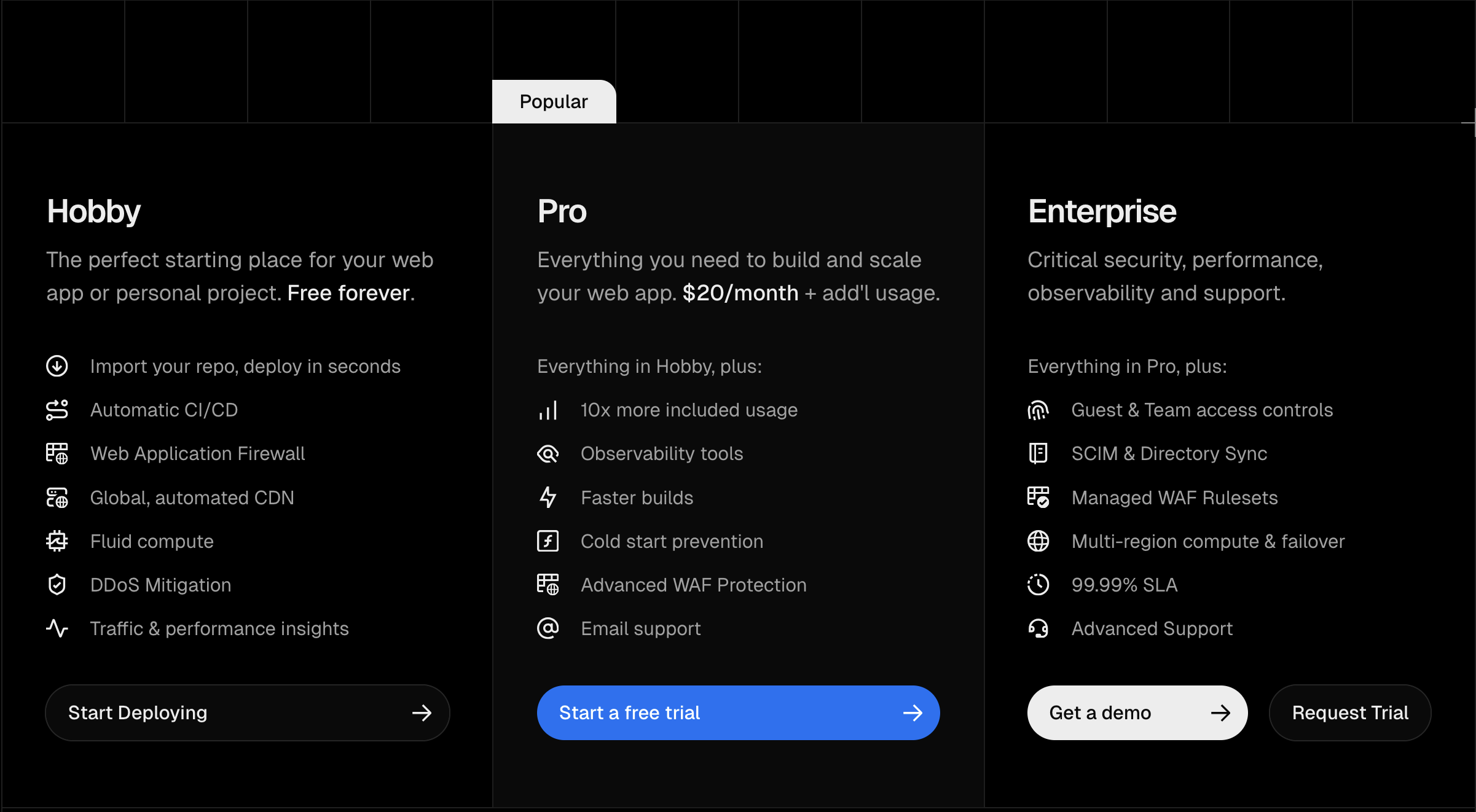
For starters, the Hobby plan does not allow you to run commercial apps, and the Pro plan starts from $20/month per user. If you exceed execution or bandwidth limits, it can easily cost $60+ per month.
Serverless
Vercel advocates and implements a so-called serverless way of running Next.js apps. In practice, it means that frontend code after the build is cached globally, and backend is packaged to quickly scale as needed and run where it is close to the users (so-called edge computing).
While certainly this brings speed improvements to the properly written apps, in practice, most of the businesses, except truly global ones, do not need edge presence and can decide on one specific region where they can host their apps
But this comes at a significant cost & complexity of the app - it is challenging to run specific workloads on this infrastructure, the execution times and available memory are limited, forcing you to rely on external services or even additional backend for more feature support.
Other serverless providers
Thanks to the OpenNext initiative, other providers can also deploy your app as serverless:
They involve similar trade-offs to Vercel: execution is bounded by the platform's limits, and configuration for non-trivial apps can get complex.
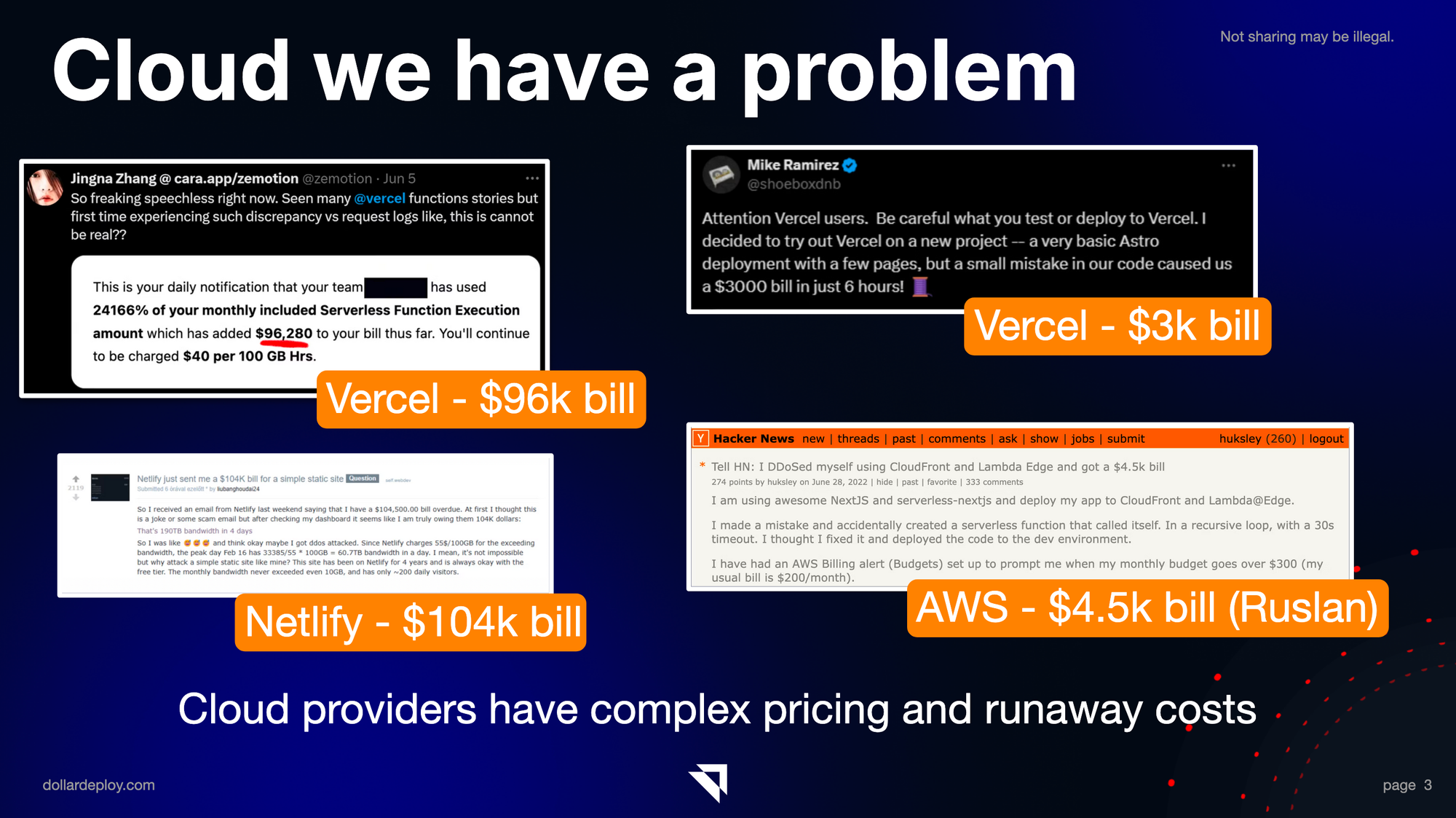
Usage-based serverless billing also carries the risk of a large, unplanned bill from a traffic surge, a misconfiguration, or rogue AI bots. Documented cases run into tens of thousands of dollars (see our breakdown of a $46k Vercel bill).
Comparing serverless to self-hosting
Compared to serverless and self-hosting, it is a bit more complicated at the start, and has a flat pricing of renting the server from a cloud provider. In return, it gives you a fully functional platform to scale your app and run different workloads.
| Feature | Self-hosting | Serverless (Vercel) |
|---|---|---|
| Next.js Support | ✅ Official | ✅ Vercel-first |
| Cold Start Performance | ✅ Instant response times | ✅ Instant response times |
| Scaling Speed | 🔴 Minutes to hours | 🟢 Milliseconds |
| Self-healing | ❌ Manual recovery | ✅ Built-in fault tolerance |
| Infrastructure Setup | 🟢 Simple configuration | 🔴 Complex architecture (for bigger apps) |
| Day-to-day Management | 🟡 Minimal maintenance | 🔴 Ongoing complexity |
| Traffic limit | 🟢 1Tb-10Tb | ⚠️ 100Gb - 1Tb (Vercel) |
| Code & Runtime Limits | ✅ No restrictions | ❌ Max 250Mb of code |
| Backend response limit | ✅ No restrictions | ❌ Max 4.5 Mb |
| API response time limit | ✅ No restrictions | ⚠️ 300s default, up to 800s |
| Multi-cloud Flexibility | ✅ Deploy anywhere | ❌ Vendor lock-in |
| Unexpected Bills | 🟢 Predictable costs | 🔴 Surprise charges |
| Resource Efficiency | 🟢 Cost-effective at scale | 🔴 Expensive per unit |
| Payment Model | ❌ Pay for reserved capacity | ✅ Pay per actual use |
| Capacity Planning | ❌ Requires estimation | ✅ No planning needed |
| True Zero Cost | ❌ Always paying for servers | ✅ Minimal cost when idle |
| Per-Developer costs | 🟢 Cheap | ❌ Can quickly escalate ($20/seat) |
Why self-hosting?
Here are some benefits to self-hosting Next.js, compared to using serverless. They are more important as your app becomes more complex, with more features and backend functionality.
Vercel free (hobby) plan limitations
- By ToS, you can't use hobby plan for commercial purposes. Vercel might detect if you have Google Ads or Google Analytics etc running on it. It seems to be rarely enforced now.
- You cannot use private repositories in the GitHub organisations (only private personal repos)
- Limited traffic and backend operations
Hard-capped pricing
Yes, if you get hit by the traffic or a wrongly written AI bot, your server will stop working, without costing you a thousand-dollar bill. And many traditional PaaS providers like Hetzner and Digital Ocean have much more generous traffic limits, in terabytes, not gigabytes.


Bigger traffic limits
Traffic limits comparison. List prices and platform limits checked September 2026; verify against each provider's pricing page and vercel.com/docs/limits.
| Provider | Free Tier | Paid Plans | Overage Charges | Notes |
|---|---|---|---|---|
| Vercel | 100 GB/mo | Pro: $20/mo (included usage) Enterprise: Custom |
Starting at $0.15/GB | ~$150/TB traffic pricing - very expensive at scale, risk of surprise bills, settings to limit costs |
| Cloudflare Pages | Unlimited* | Pro: $20/mo Business: $200/mo |
No bandwidth charges | Unlimited but you need to use their CDN for video / large files |
| DigitalOcean droplets | 500 GB - 1 TB free tier | 1TB - 10TB depends on VPS size | $0.01/GiB overage | Generous bandwidth and cheap pay per use. |
| Netlify | 100 GB/mo | Starter: $19/mo (400GB) Pro: $99/mo (1TB) |
$0.55/GiB | Risk of surprise bills, very expensive traffic |
| Hetzner Cloud | 1TB included | ~$7/mo VM (CX23) (~20TB traffic in EU) |
~$1/TB after limit | US locations include ~1 TB vs ~20 TB in EU |
No execution time or memory limits
When you run your app on the server, there are no inherent limits set by the framework. You can limit your execution yourself, or memory is limited only by the amount of RAM on your host, or how much you allocated memory to your app.
Also, response limit payload from the backend is not limited, as opposed to Vercel, where it is max 4.5Mb
 Ruslan Gainutdinov
Scheduled tasks support
You don't need to use an external service for task scheduling - use the cron format and ping your backend endpoint to execute the cron job.
These cron jobs can be as long running as you want, as opposed to max 60s on Hobby plan and 300s on Pro plan.
Websocket and SSE support
Websocket or SSE (server-side events) is a popular way to add interactivity to your app, for example, for AI chat, or other.
When you self-host, you don't need to do anything special (besides configuring Nginx or your reverse proxy properly). On Vercel's serverless functions you need special configuration or a third-party; Cloudflare supports WebSockets through Durable Objects rather than plain serverless functions.
Queues and background jobs
Long-running background workers are constrained on serverless. Vercel offers Cron Jobs and queue/background functions, but always-on workers and long jobs fit a persistent server better.
When self-hosting, you can implement that using BullMQ Node.js library and Redis for powerful, full-featured background jobs processing.
PDF generation
Because of memory and time constraints, it can be difficult to generate a PDF on the backend. One common way to do it is to run Puppeteer on the server, but this is impractical on serverless functions, where headless Chrome is constrained by deployment size, memory and execution-time limits.
If you self-host, you can just run this normally, as regular code, just make sure you have all dependencies installed.
Screenshot or website scraping
This is impractical on serverless for the same reason as Puppeteer above: it needs Puppeteer or Playwright driving a real Chrome browser, which the serverless size, memory and time limits make hard to run.
Using a third-party is always an option, but at that moment, your app looks like a patchwork of services, not an independent project.
Running your LLMs
Large language models and your own AI need a lot of memory to run, sometimes also GPU support on the host. This is not feasible on Vercel or serverless functions; you either call hosted APIs (OpenAI/Anthropic/Perplexity) or run the model on a server with enough RAM or a GPU.
Conclusion
Using the right tools for self-hosting makes your costs predictable and architecture simpler, as you don't need to rely much on third-party services.
Try using DollarDeploy - it makes deploying Next.js apps easy. And you can choose which hosting provider to use, and with our Digital Ocean and Hetzner integration, it is very easy to create a new server and run your Next.js app on it.
Here in 4 minutes we run our Next.js app on a newly created Hetzner server!