New release 1.60 - Team roles, build history and AI approvals
In this release we added support for role-based access (RBAC), a redesigned app shell, app build history with one-click rollback to a previous build, and approvals for AI agent actions.
In this release we added support for role-based access (RBAC), a redesigned app shell, app build history with one-click rollback to a previous build, and approvals for AI agent actions.
🎉 What's New
👥 Team roles and permissions
Invite teammates and give each one only the access they need.
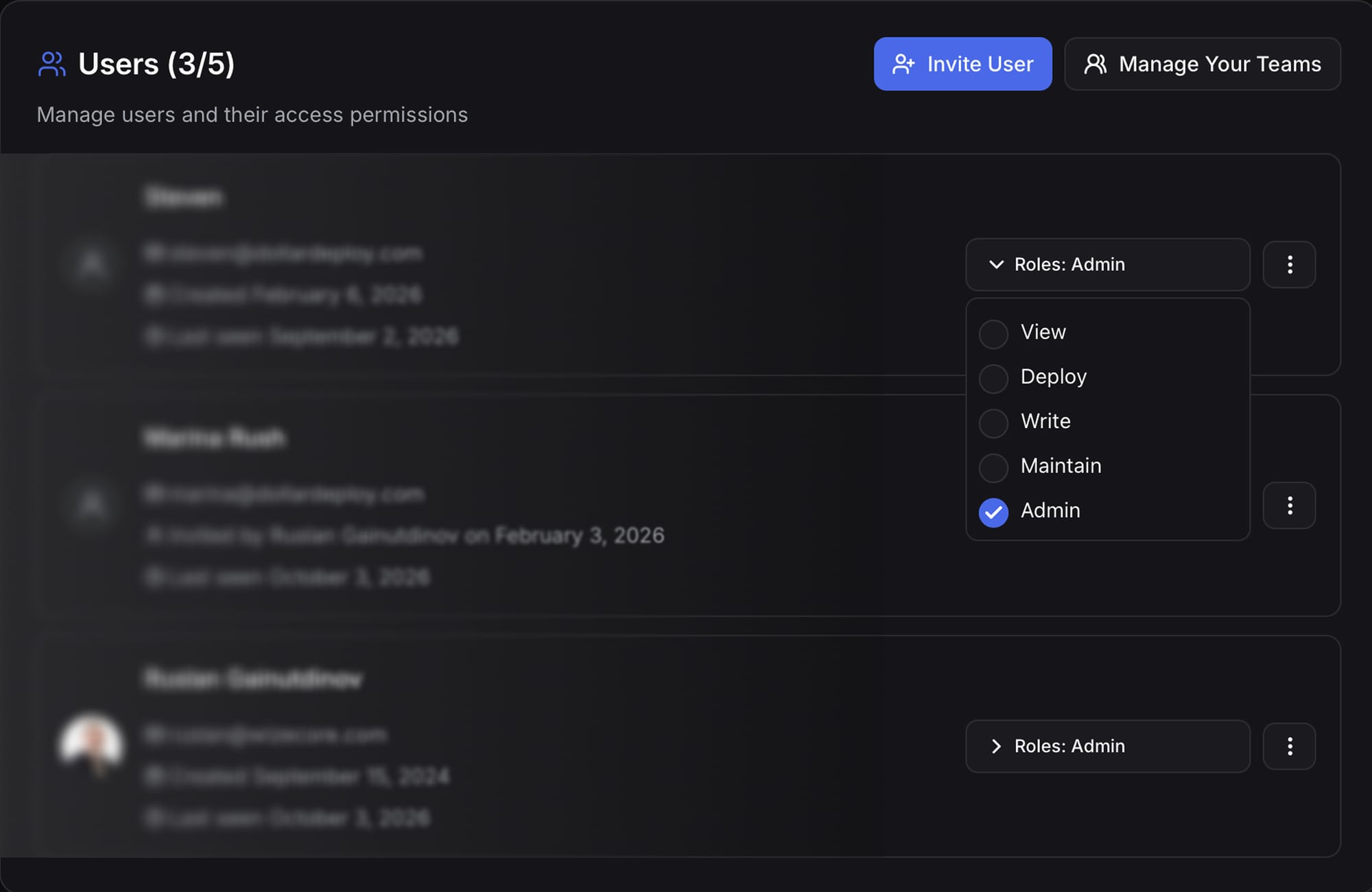
There are five roles:
- View - see apps and hosts, change nothing
- Deploy - deploy apps and hosts
- Write - create your own apps and hosts, change their settings, delete them
- Maintain - manage any app or host
- Admin - integrations, billing, users and team settings
You can give a role for the whole team or for one project, app or host. For example, a contractor can deploy one app without being able to touch the server it runs on. Env vars stay hidden from anyone without write access to that app.
🖥️ New app shell
The sidebar is now resizable: drag the edge to resize it, drag it all the way in to collapse it to icons, and it remembers the width. Cmd+B toggles it. Host and app pages get one merged header with breadcrumbs, status and actions in one row.
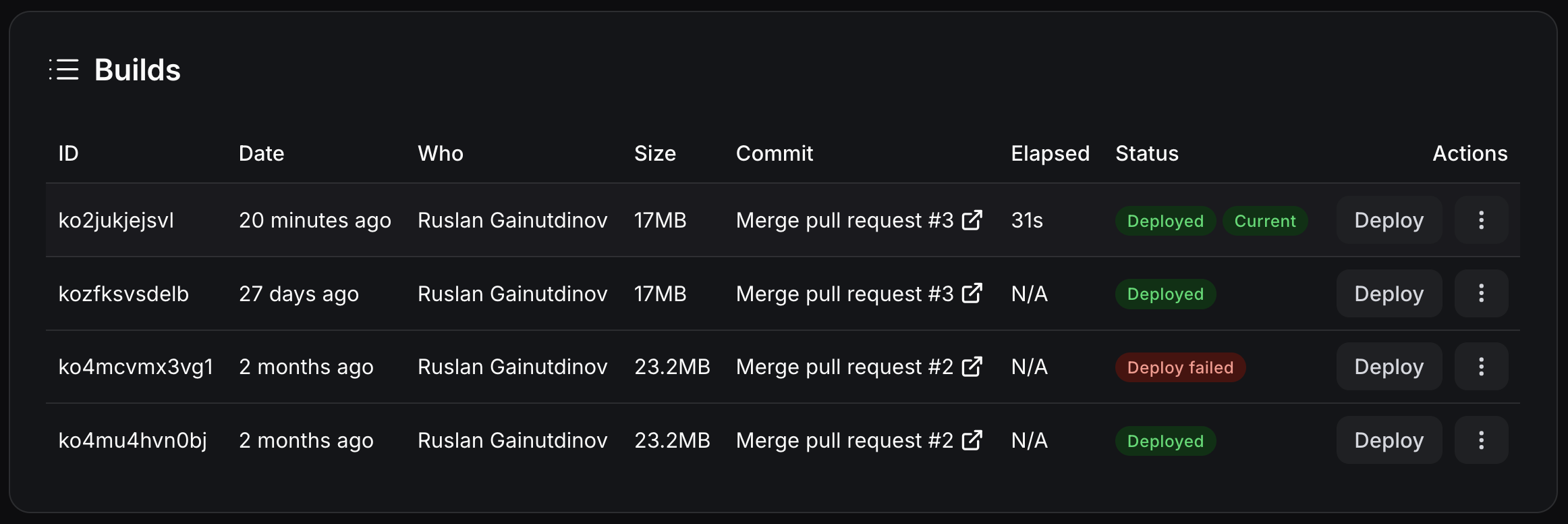
📦 Build history and redeploy any build
The app overview now has a Builds table: date, who started it, size, build time and status, with a Deployed badge on the build that is live. Press Deploy on any earlier build to ship it again without rebuilding. Builds now link to the pull request, not only the commit. The deploy-app MCP tool can deploy a specific build too.
🔒 Unattended upgrades by default
Automatic Linux security updates are now enabled when a host is prepared. Existing hosts get them the next time you press Prepare. Automatic reboots are off by default. To allow them, pick a time with UPDATES_RESTART_AT=01:00 in the host env (host timezone, UTC by default).
🤖 Agentic AI upgrades
-
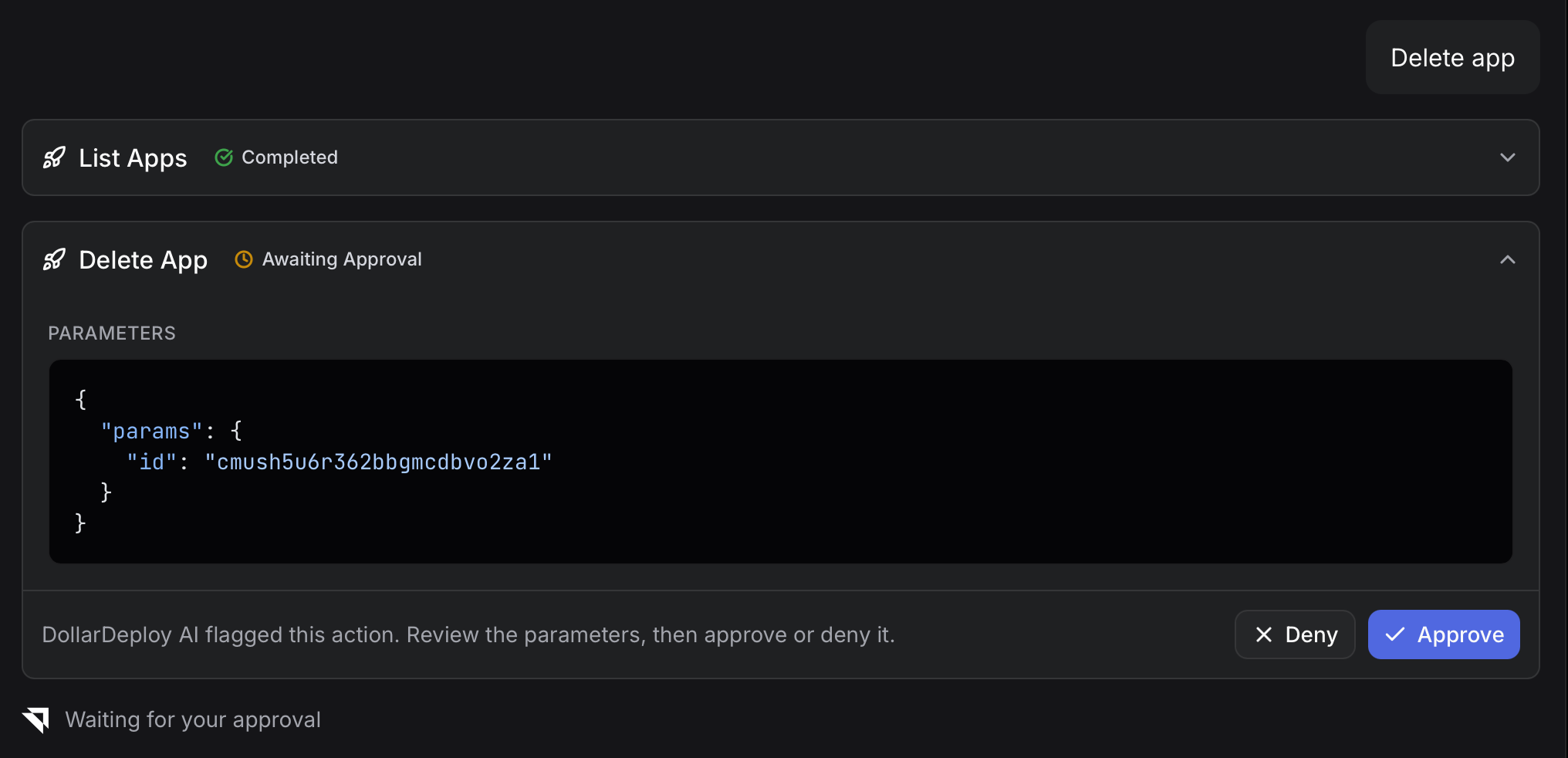
Approve or deny AI actions. When the AI chat wants to change something (create a server, delete an app), the call can pause for you to Approve / Deny in the chat. After you approve, the result shows up in the chat right away, no reload needed. Stop and Esc now stop a running answer. A Typesafe AI check flags risky or expensive changes before they run. Tool inputs are redacted before the check.
-
MCP tools split into read-only and write/delete. Claude, Cursor and other MCP clients now group DollarDeploy tools into two sections, so you can allow reads and keep writes on manual approval.
Learn more about our MCP support
💻 DollarDeploy CLI improvements
Run ddc deploy inside a git repo and it deploys the current folder. It picks up the repo from your origin remote and the current branch, reads env vars from .env.production (or .env.local), and shows an overview to confirm before deploying, with all env values masked.
It warns you about uncommitted or unpushed changes, since the build runs from the remote. Use --yes in CI.
ddc host update <host-id>changes a host's name, IP, hostnames, env and moreddc user(aliasddc auth status) shows your roles- Running
ddc deployagain no longer creates a duplicate app - Deno apps are detected from
deno.lock
Install or update the CLI:
> npm install -g @dollardeploy/cli
🚀 Create now, deploy later
Some templates need config before their first run, like an HF_TOKEN for vLLM. These templates now show a note before launch and offer Deploy later: DollarDeploy prepares the host and creates the app and its services, then stops. You set the env vars in App details and deploy from there.
💅 Fixes & Improvements
- If another process already holds your app's port, the deploy now fails and names that process. Before, the other process could answer the health check and the deploy reported success while your app was not running. Set
DEPLOY_PORT_CHECK=0to skip the check. - Protected projects now block deprovisioning hosts, removing apps and deleting services.
- Fixes for Ubuntu 26.04 hosts.
- Node builds reinstall nvm when
nvm.shis missing. - Team management: people who declined or were removed can be invited again, Invite is disabled when you reach the member limit, and only admins can edit members (anyone can edit their own name).
- Cleaner git info in build and deploy notifications.
- New toasts, light mode fixes, and fixes to Changelog rendering in the settings.
As always, updates roll out automatically. There is nothing to install.
Deploy to your own infra from $5/mo. Rust webapps, Next.js, Go, Python with scheduled backups, automatically provisioned Postgres, Redis and more. No Vercel bills, no Docker, no lock-in.