New release 1.62 - Cron jobs, host inspection and scoped API keys
In this release we added cron jobs for apps and hosts, a host inspection report on the Host => Health tab, scoped API keys and AI agent auth that can be limited to a project and kept away from your secrets, and zero-config for Python uv apps.
In this release we added cron jobs for apps and hosts, a host inspection report on the Host > Health tab, scoped API keys and AI agent access that can be limited to a project and kept away from your secrets, and zero-config for Python uv apps.
🎉 What's New
⏰ Cron jobs for apps and hosts
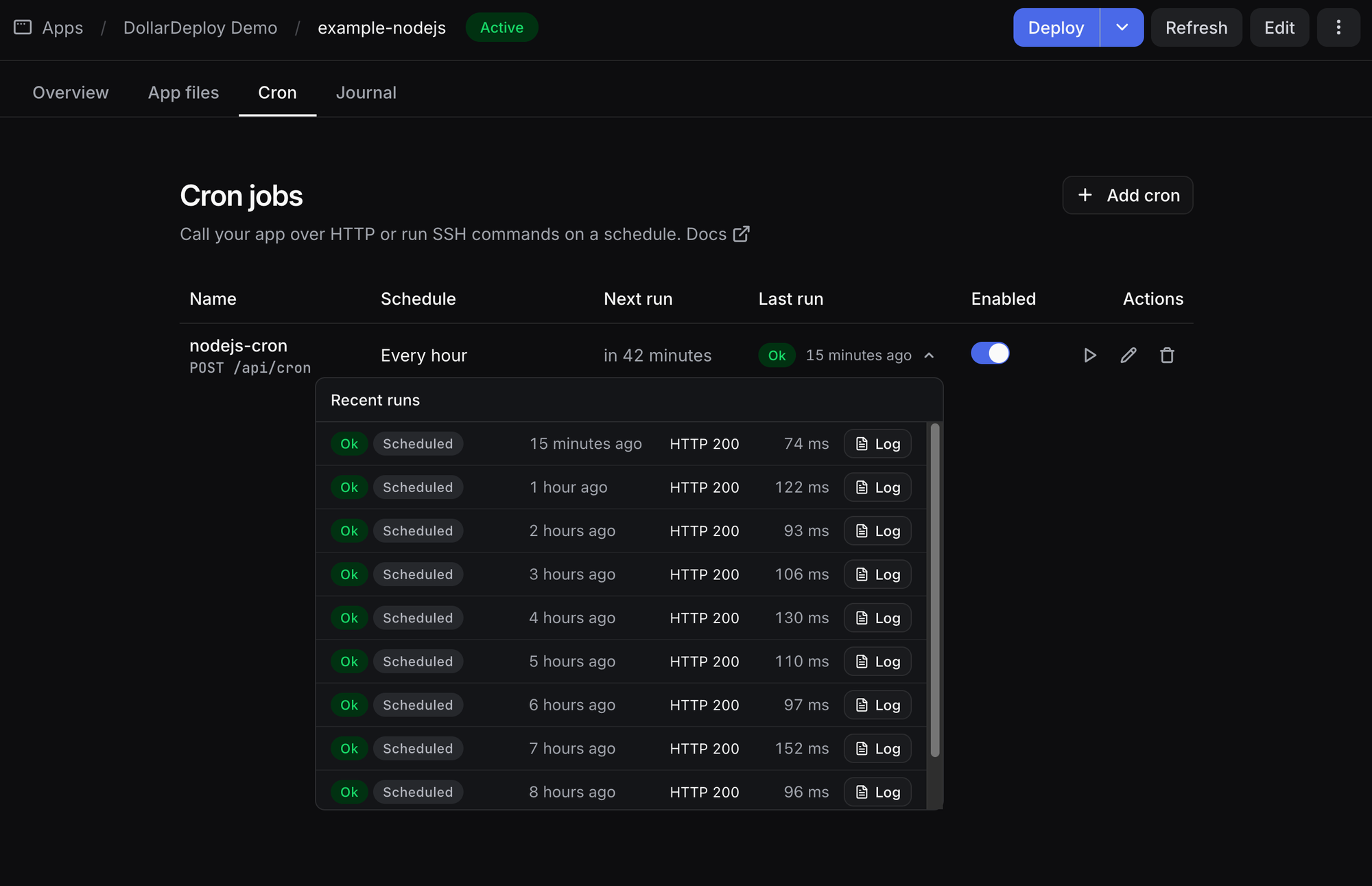
Apps and hosts now have a new Cron tab. DollarDeploy is the scheduler, so there is no crontab to edit on the server. Each run shows up as a task with logs, retries and notifications.
There are three kinds of cron jobs:
- App, HTTP - calls your app via HTTP(s), like
/api/cron, withAuthorization: Bearer $CRON_SECRET. The secret is added to the app env for you, redeploy your app once to pick it up. - App, command - runs a shell command in the app directory as the app user, with the app env.
- Host, command - runs a shell command on the server as the login user, with the host env.
Pick a preset (every 10 minutes, hourly, daily, weekly) or write your own cron expression, and see when it runs next before you save. Run now starts a cron run right away.
Each run is capped at 60 seconds and can retry up to 3 times. Commands run as their own temporary systemd units, so the cap is enforced on the server and two runs of the same job never overlap. You get one notification when a cron starts failing and one when it recovers.
The Cron tab has copy-paste examples for Next.js (App and Pages Router), Express and curl that check the secret.
Cron jobs are available on paid plans only: Hobby gets 1 app and 1 host cron, every 10 minutes at most. Pro gets 5 app and 5 host crons, down to every minute.
Crons are also available via the API, the MCP server and the CLI:
Install our CLI with npm install -g @dollardeploy/cli, then:
> ddc cron create --app <app-id> --type http --path /api/cron --schedule "*/15 * * * *"
> ddc cron run <cron-id> --wait
🩺 Host inspection
Press Inspect in the host menu and DollarDeploy checks the server and shows a report on the Health tab. It covers 13 areas: containers, Docker, system journal, kernel, packages, boot, resources, services, ports and firewall, web analytics, SSH access, managed services and apps. Each area gets an ok, warning or error status.
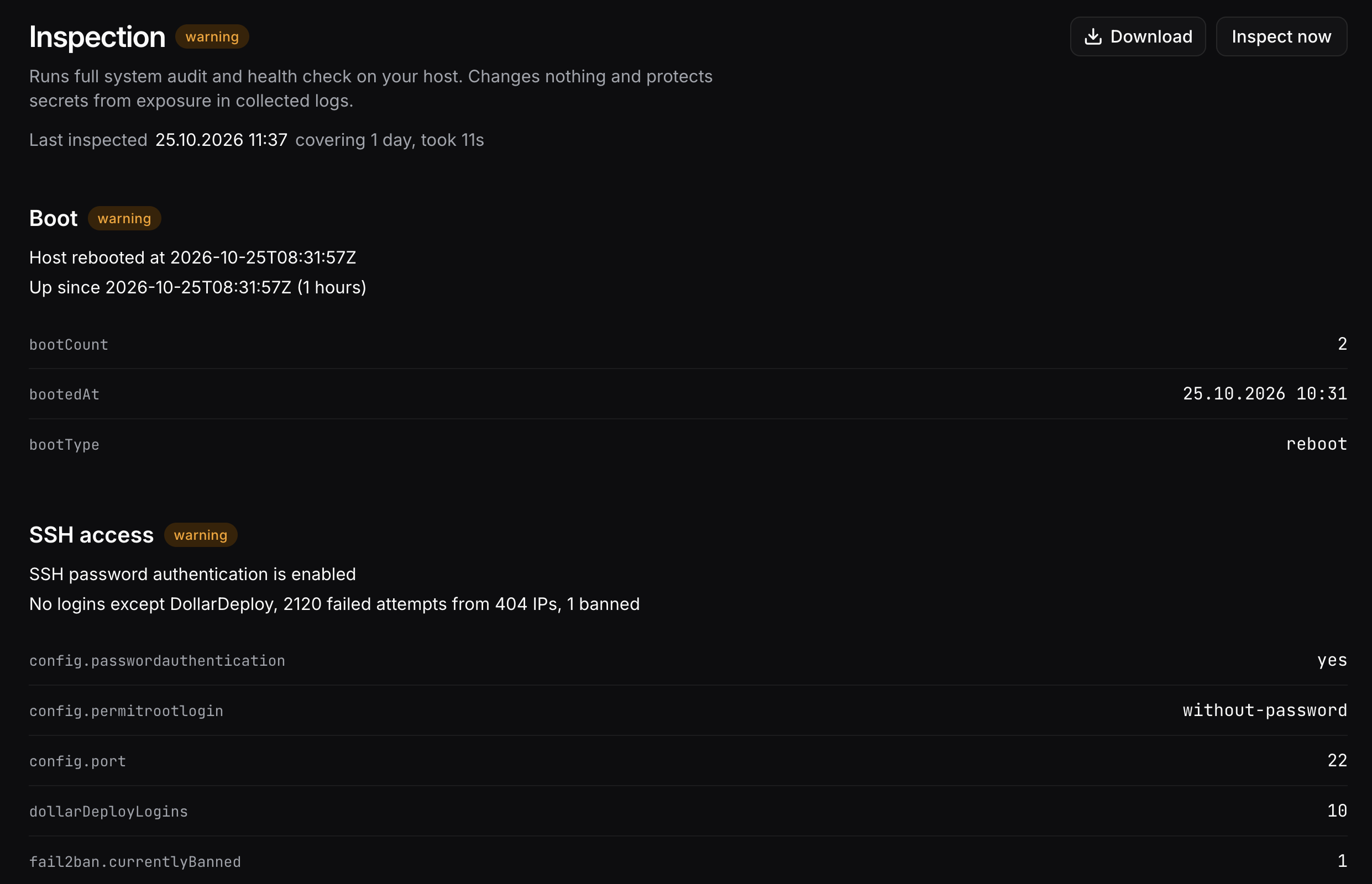
It catches problems that a per-app health check does not see, for example:
- Docker containers that did not come back after a Docker upgrade restarted the daemon
- Crash loops and out of memory kills
- Security updates waiting for more than 2 days
- Redis that can't save to disk, Postgres connection count, long queries and the largest tables
- HTTP and HTTPS not answering, firewall rules for 80/443/SSH, certificates close to expiry
- SSH logins that are not from DollarDeploy, public listeners, disk filling up
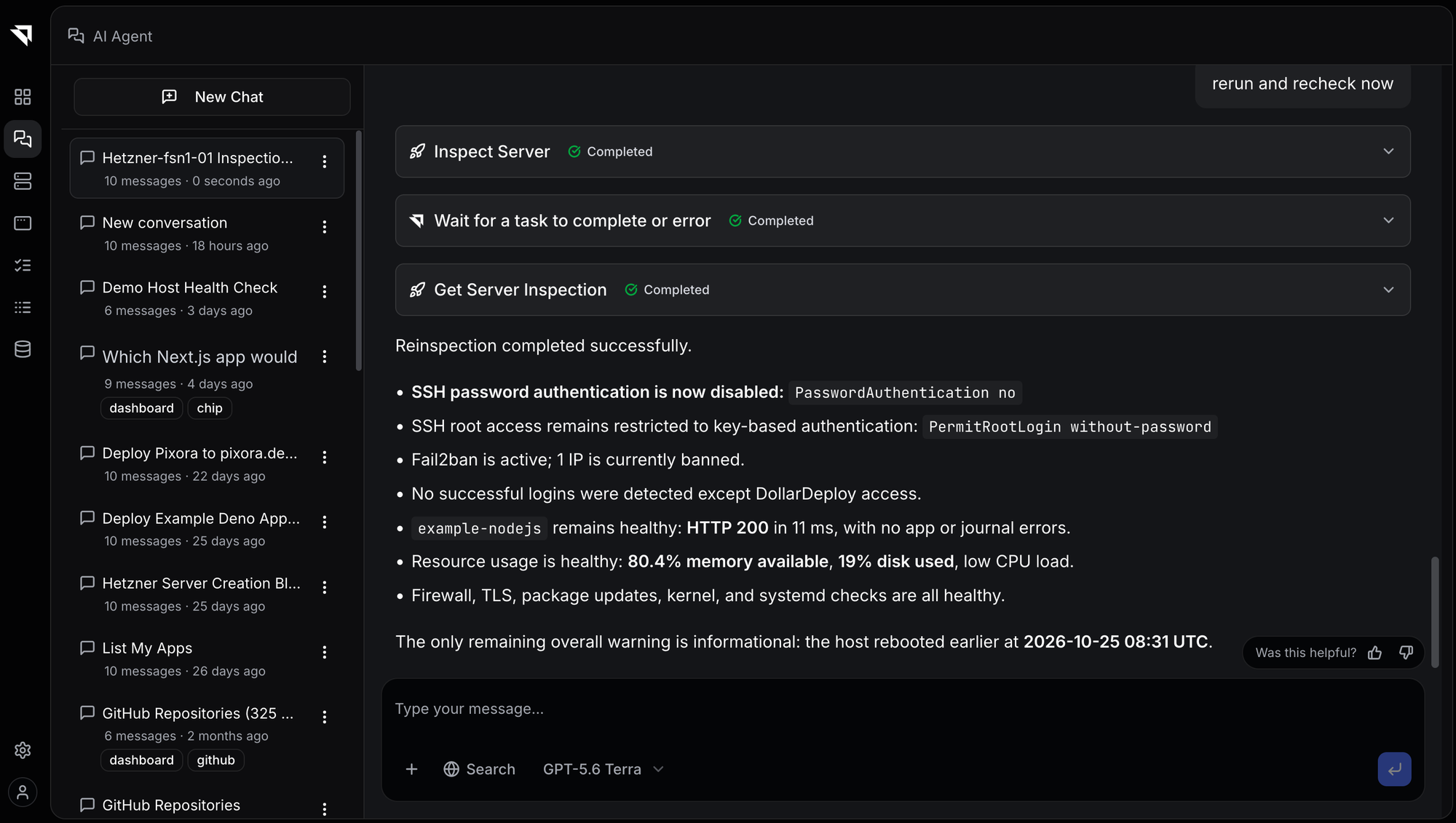
Inspection only reads. It changes nothing on the server and masks secrets in the output. Download gives you the full output as JSON. Running an inspection needs the Maintain role. DollarDeploy AI and other AI agents can run it too with the new MCP tools. It is in the API too, and CLI support is coming soon.
🔑 Scoped API keys and AI agent access
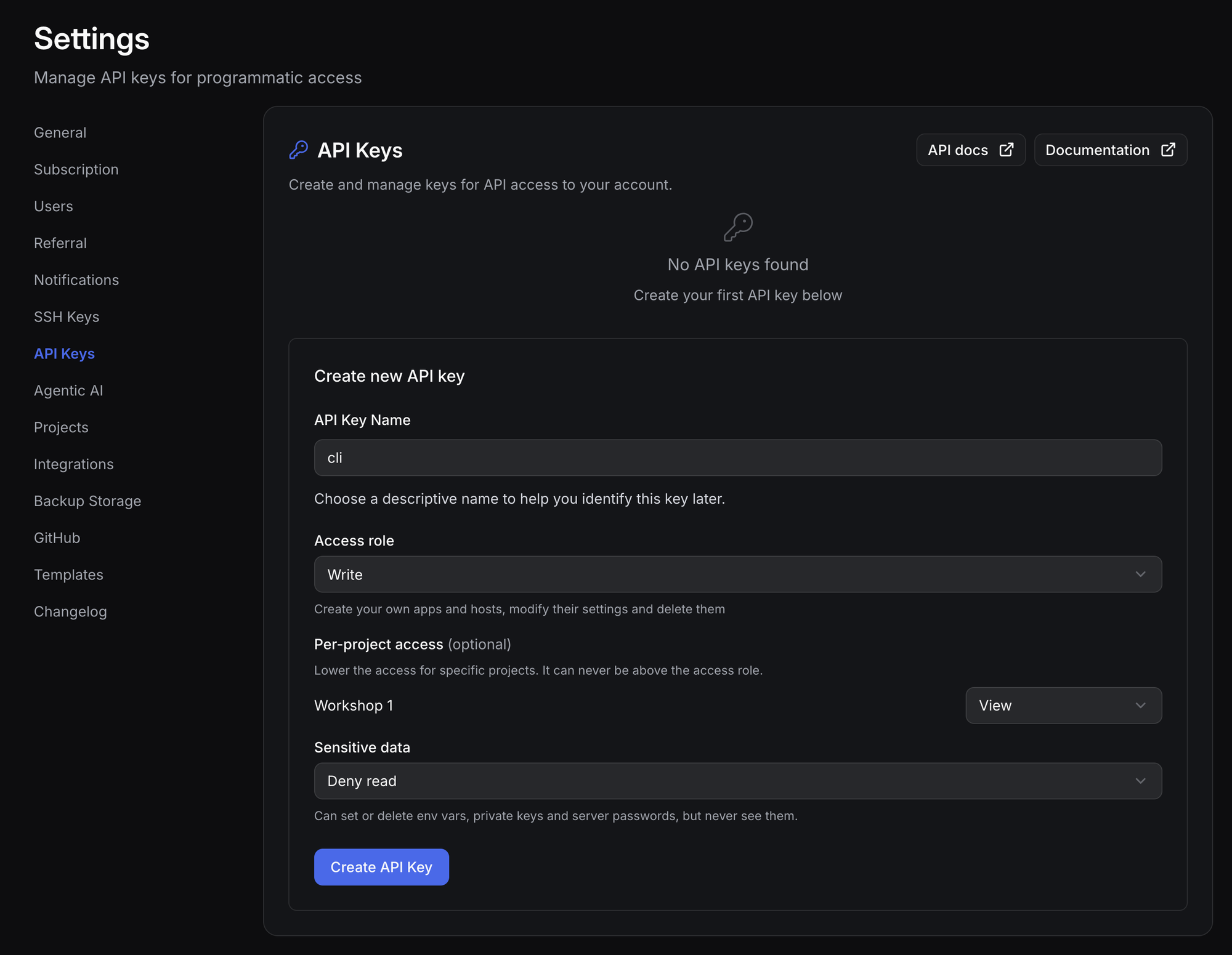
When you create an API key, or connect Claude, Cursor or another MCP client, you now choose what it can do:
- Access role - View, Deploy, Write, Maintain or Admin, never more than your own role
- Projects - optionally limit the key to some projects
- Sensitive data - Full access, Deny write, Deny read, or Deny read and write
Sensitive data means env vars, SSH private keys and server passwords. With Deny read, an AI agent can still list apps, deploy and read logs, but env values come back empty and it only sees the env var names. It can still propose and add new values. All MCP connections default to Deny read. A deny applies even to admin keys. Settings > API keys has a new Access column that shows what each key can do.
If your role does not allow you to read an app's env, you can still add or change values, and the hidden ones are kept.
🤖 MCP server for AI agents
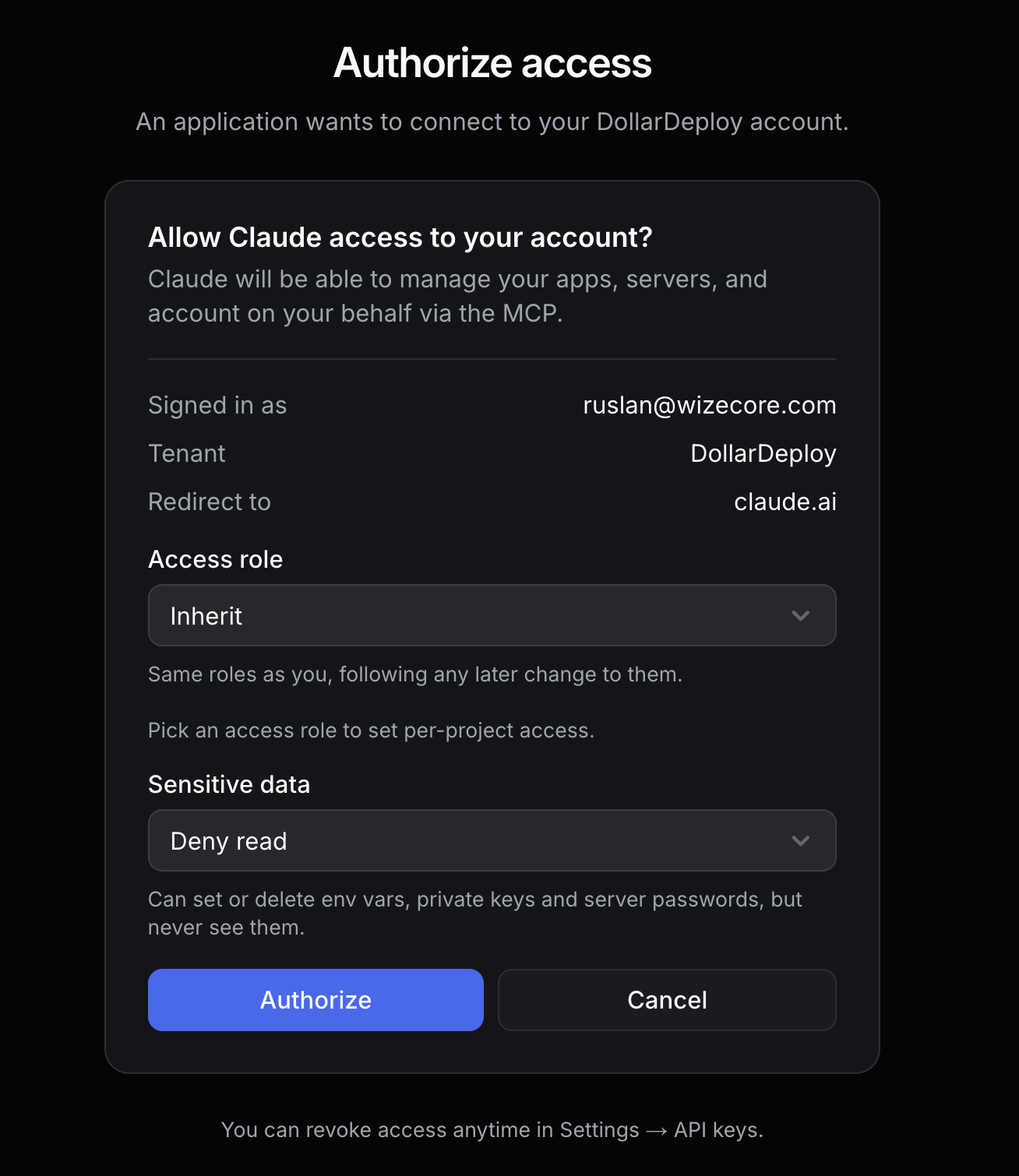
When you connect Claude, Cursor or another MCP client, DollarDeploy now shows an authorization dialog. You choose the access role and the sensitive data access for that connection, the same options as for an API key. Inherit follows your own roles, and Deny read is the default for sensitive data. You can revoke access anytime in Settings > API keys.
The MCP server also has 9 new tools: list-crons, cron-get, cron-create, cron-update, cron-delete, cron-run and list-cron-runs for cron jobs, and server-inspect and get-server-inspection for host inspection. Ask your agent to check a server or to schedule a nightly cleanup, and it works within the access you gave it.
Learn more about our MCP support
🐍 Zero-config Python uv apps
Deploy a Python app with a uv configuration and DollarDeploy now sets it up for you: the build runs uv sync --frozen --no-dev, and if there is a main.py the start command runs it with uv run, or with uvicorn if main.py defines a FastAPI style app. uv is installed on the host when needed, the .venv folder is no longer shipped with the build, and uv packages and Python versions are cached between builds.
> ddc deploy --url https://github.com/dollardeploy/example-python-uv
💅 Fixes & Improvements
- The status badge in the app Builds table now opens the log behind it: the deploy log once the build is deployed, the build log before that. The dropdown menu also has Build logs and Deploy logs.
- Prepare now installs pending package updates every time you run it and restarts the services that use updated libraries. Before, it could skip updates and you had to wait for the daily run. Set
PREPARE_UPGRADE=0in the host env to turn it off. - Redis, Postgres, MongoDB and MariaDB that listen on the Docker network now start after Docker. Before, after a reboot Redis could start too early and stay down. Existing hosts get the fix on their next Prepare.
- The monitoring agent reports when Redis can't save to disk and collects the Redis log. Redis blocks all writes in that state, so this shows up as failing cache writes in your app.
- The deploy script is no longer copied into the app directory. It contains your app env and was readable by other users on the server. If you deployed before this release, delete
deploy.shfrom your app directory. - Hosts, the browser console and HTTP crons refuse internal, private, loopback and cloud metadata addresses.
- Prepare turns on Docker live-restore, so containers keep running when Docker is upgraded or restarted, and caps container logs at 5 files of 100 MB. Set
HOST_DOCKER_LOG_MAX_SIZEin the host env to change the size. - SSH private keys pasted directly into a host moved to Settings > SSH keys (named
host) and stay linked to the host, so they follow the same access rules as other SSH keys. - Fixed a crash in New host > Provision new server when GitHub was your only connected integration.
- The AI agent can read repos that contain symlinks, like tldraw, and shows the real error when a clone fails.
As always, updates roll out automatically. There is nothing to install.
Try DollarDeploy now!
Run production apps on your own infra, without worrying about system updates, security vulnerabilities and operational burden. We support a wide range of apps, with crons, scheduled backups and automatically provisioned local Postgres and Redis for your app. No Vercel bills, no Docker, no lock-in.